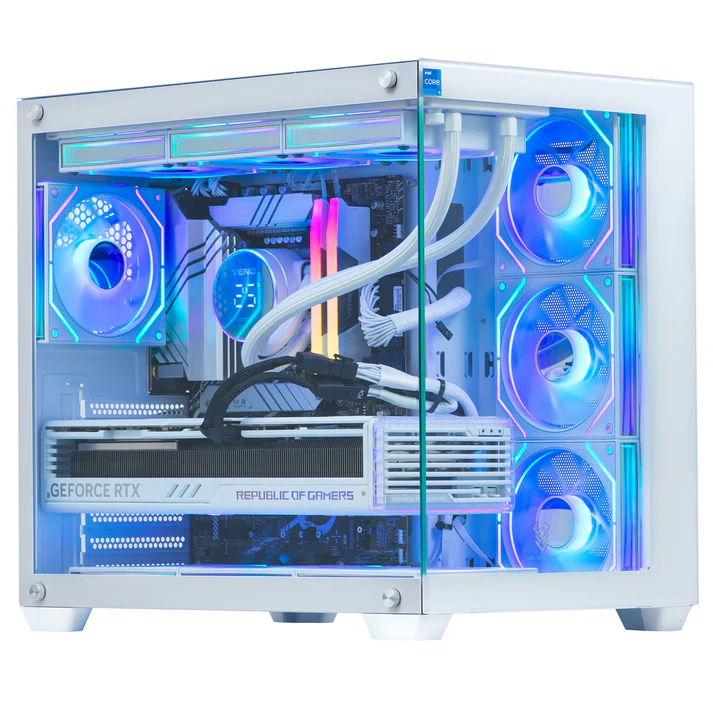
When it comes to building or upgrading a gaming system, choosing the right PC Components is the key to unlocking powerful performance, smooth gameplay, and immersive visuals. Many gamers assume that a high-end graphics card alone is enough, but in reality, gaming performance depends on a balanced combination of hardware components working together.
Whether you are building a high-end gaming rig or a gaming pc for Minecraft, understanding which PC components impact performance the most will help you make smarter decisions and get the best value for your money.
In this guide, we’ll explore the top PC components that make the biggest difference in gaming performance and explain how each part contributes to a better gaming experience.
1. Graphics Card (GPU): The Heart of Gaming Performance
The Graphics Processing Unit (GPU) is the most important component for gaming performance. It handles rendering graphics, textures, lighting, shadows, and visual effects in games.
Why GPU Matters Most
- Higher FPS (frames per second)
- Better graphics quality and resolution
- Smooth gameplay in demanding games
For modern games like PUBG, GTA V, Cyberpunk 2077, and even a gaming pc for Minecraft with shaders and mods, a powerful GPU is essential.
Recommended GPU Levels
- Entry-level: GTX 1650, RX 6400
- Mid-range: RTX 3060, RX 6700 XT
- High-end: RTX 4070/4080, RX 7900 XT
If you want to maximize gaming performance, investing in a good GPU should be your top priority among all PC components.
2. Processor (CPU): The Brain Behind Performance
The CPU (Central Processing Unit) is responsible for handling game logic, AI, physics, and background tasks. While the GPU renders graphics, the CPU ensures the game runs smoothly without bottlenecks.
Impact of CPU on Gaming
- Improves FPS in CPU-intensive games
- Reduces stuttering and lag
- Enhances multiplayer performance
Games like Minecraft, strategy games, and esports titles rely heavily on CPU performance. That’s why a strong CPU is crucial for building a high-performance gaming pc for Minecraft.
Recommended CPU Options
- Budget: Ryzen 5 3600, Intel i5-10400F
- Mid-range: Ryzen 5 5600X, Intel i5-12400F
- High-end: Ryzen 7 5800X3D, Intel i7-13700K
A balanced CPU-GPU combination is essential when choosing PC components for gaming.
3. RAM (Memory): Speed and Multitasking Power
RAM plays a significant role in gaming performance, especially when running modern games alongside background applications like Discord, browsers, or streaming software.
How RAM Affects Gaming
- Faster load times
- Smooth multitasking
- Reduced stuttering in open-world games
For most gamers, 16GB of RAM is the sweet spot.
Recommended RAM Configuration
- Minimum: 8GB DDR4
- Recommended: 16GB DDR4/DDR5
- High-end: 32GB for heavy multitasking
For a gaming pc for Minecraft, faster RAM can significantly improve performance, especially when using mods and texture packs.
4. Storage (SSD vs HDD): Speed Matters
Storage is often overlooked, but it plays a crucial role in gaming performance. While it doesn’t directly increase FPS, it significantly improves load times and overall system responsiveness.
SSD vs HDD
- HDD: Slower load times, cheaper
- SSD: Faster boot and game loading, smoother performance
Best Storage Setup
- NVMe SSD (500GB–1TB) for OS and games
- HDD or SATA SSD for additional storage
For modern gaming, an SSD is one of the most impactful PC components you can upgrade.
5. Motherboard: The Foundation of Your Build
The motherboard connects all PC components and determines compatibility, upgrade options, and features.
Why Motherboard Matters
- Supports CPU and RAM types
- Provides expansion slots for GPU and storage
- Impacts future upgrades
While it doesn’t directly affect FPS, choosing a good motherboard ensures stability and long-term performance.
6. Power Supply (PSU): Stability and Reliability
A reliable power supply is essential for maintaining system stability and protecting your components.
Key PSU Features
- 80+ Gold certification
- Adequate wattage (650W–850W for gaming PCs)
- High-quality build
A poor-quality PSU can limit performance and even damage your PC components.
7. Cooling System: Keeping Performance Consistent
Thermal performance directly affects gaming performance. Overheating can cause throttling, reducing FPS and system stability.
Cooling Options
- Air coolers (budget-friendly)
- Liquid cooling (high-performance)
- Case fans for airflow
For long gaming sessions, effective cooling is essential to maintain peak performance.
8. Monitor: Unlocking True Gaming Performance
While not technically a PC component, your monitor plays a crucial role in how you experience gaming performance.
Key Monitor Features
- High refresh rate (144Hz or 240Hz)
- Low response time
- High resolution (1080p, 1440p, 4K)
A high-refresh-rate monitor can make even a mid-range gaming PC feel significantly faster.
9. Balance Between PC Components
One of the biggest mistakes gamers make is focusing too much on one component while neglecting others. For example:
- High-end GPU + weak CPU = bottleneck
- Fast CPU + slow storage = poor responsiveness
- Large RAM + weak GPU = limited gaming performance
To build a powerful system, you must balance all PC components effectively.
